Orchard: the AI college & career readiness platform
The Impossible Problem
How do we prepare students for a labor market that won't stop moving?
Orchie
Our AI Career Counselor. Helping students get ready for life after high school.
02Career Readiness Index
A personalized map of where students shine and where they have room to grow, their progress made visible.
03Explore, Plan, Learn
Explore the possibilities, plan out the goals, and learn the real-world skills to get there.
Orchie
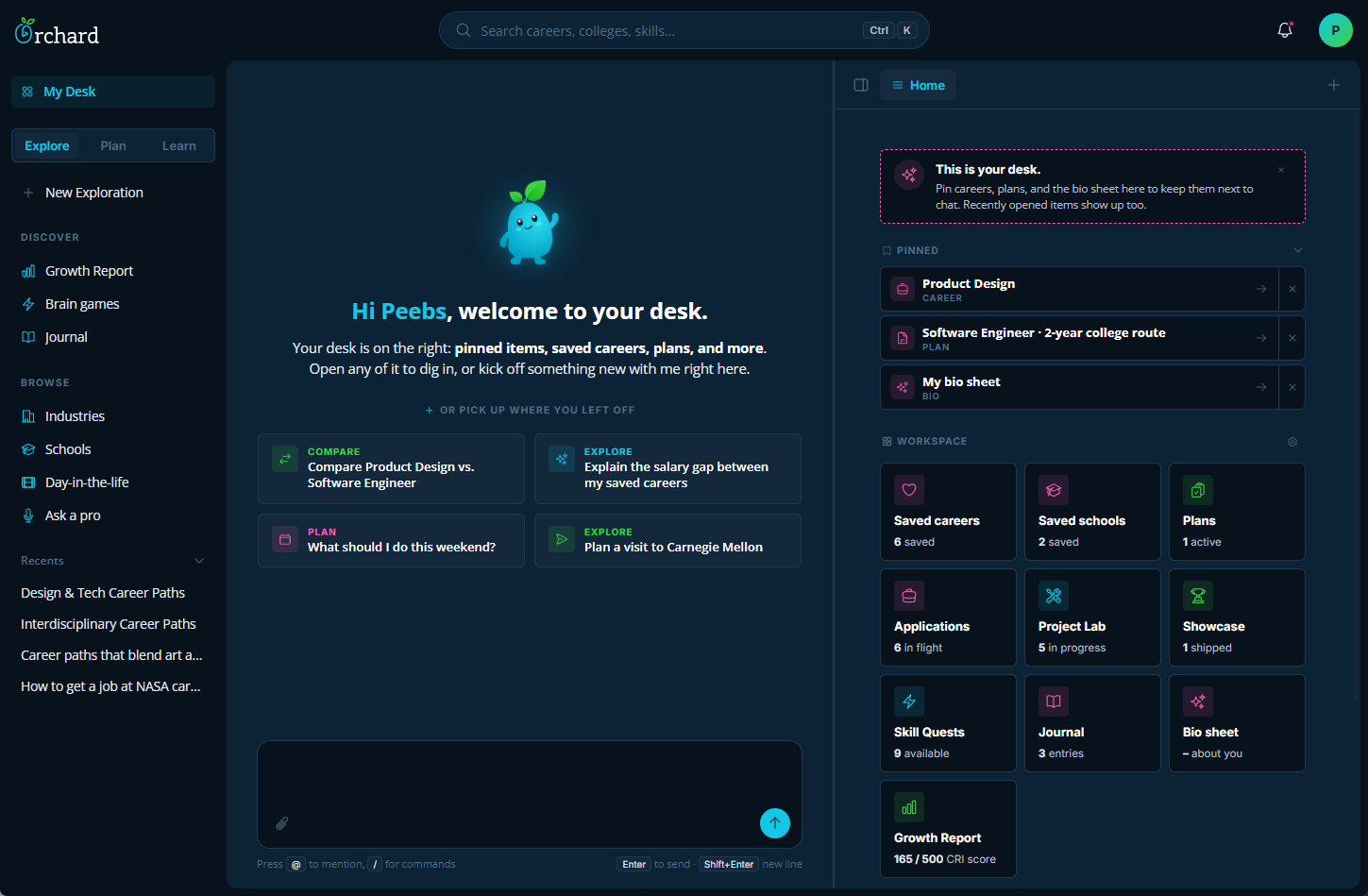
Always guiding, never driving. We designed Orchie to be the ultimate College and Career counselor for high schoolers, offering timely nudges, tailored advice, and steady encouragement while keeping the student at the absolute center of their own growth. (And no, Orchie won't write their college essays.)
 1
2
3
1
2
3
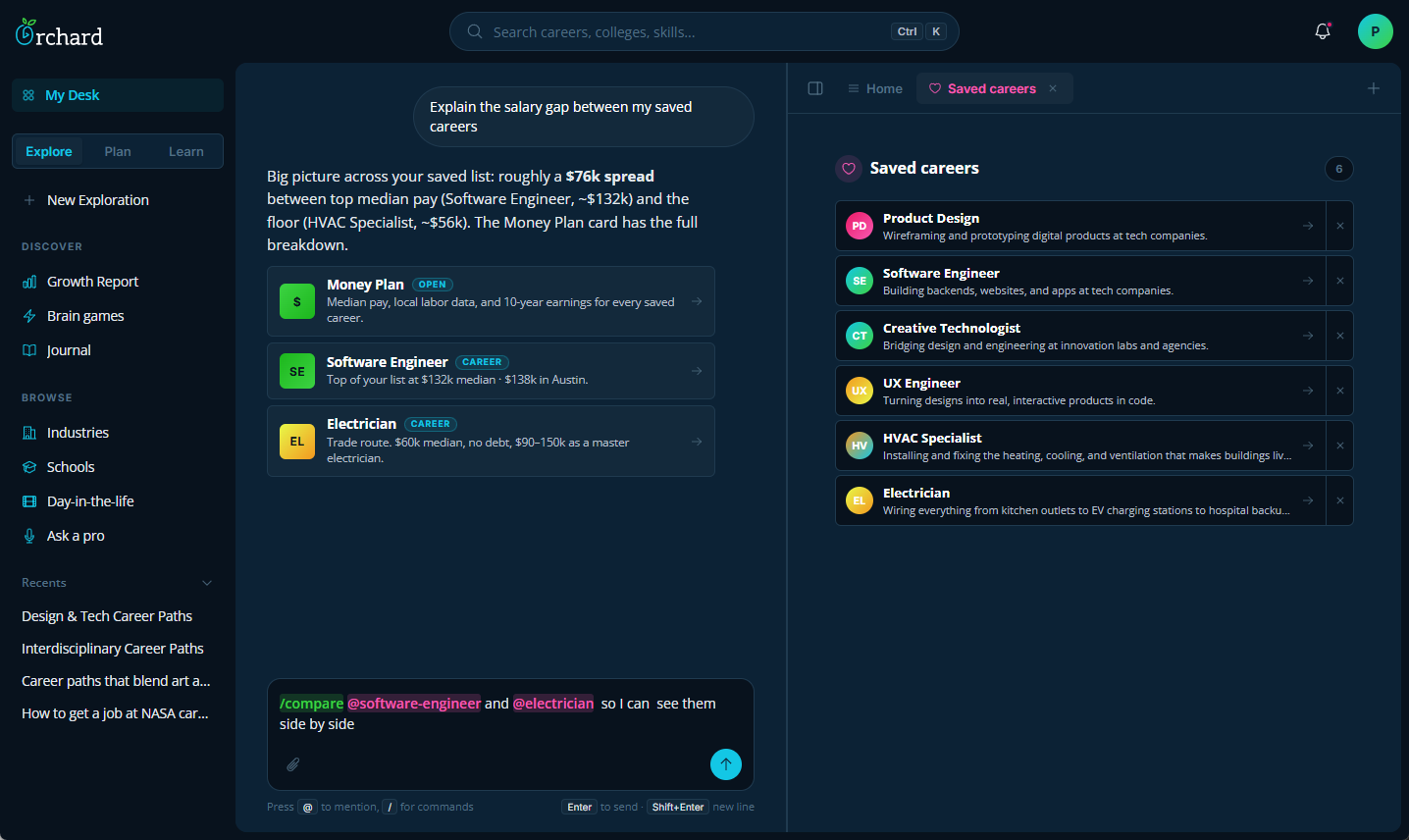
- 1 Orchie will always try and respond with an answer and a next step action for the student to keep their momentum going. Having Orchie respond with an open ended question often leaves the student stunned and unsure of what to do next.
- 2 The desk stays open right next to Orchie. Whatever the student has pinned gets prioritized in every answer, because that's almost always what they actually wanted to talk about.
- 3 Typing @ pulls up a saved career, typing / lists commands. Those patterns show up everywhere in Orchard, so the chat doubles as a safe place to practice the AI fluency they'll need at school or work.
 1
2
3
1
2
3
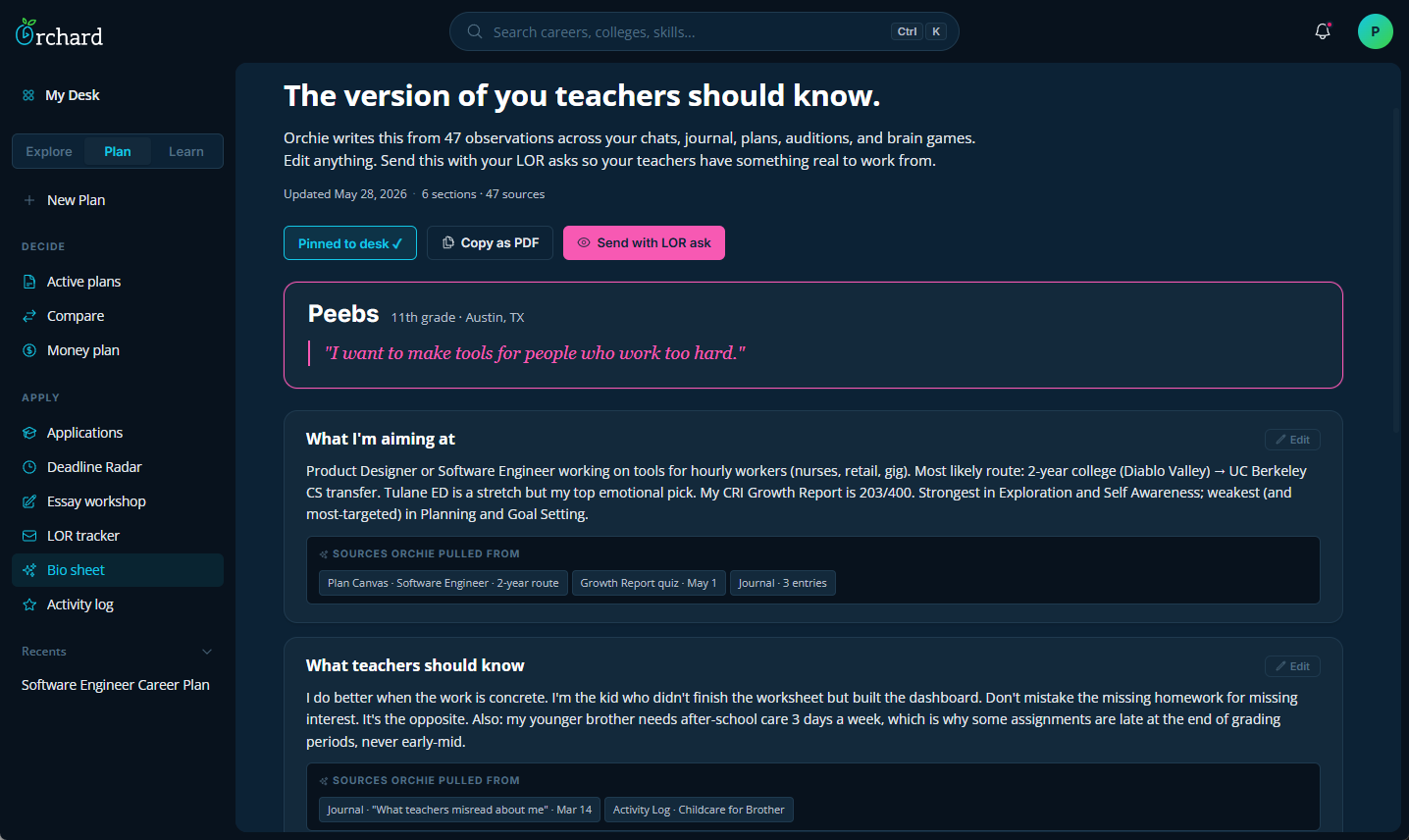
- 1 When a teacher sits down to write a recommendation, the best thing they can have is concrete examples. So Orchie drafts a starting point from things the student actually did, and the student edits it before sending.
- 2 Every claim links back to where it came from. A journal entry from March, a specific plan, a quiz result. If something doesn't sound like the student, they can see why and rewrite it.
- 3 Orchie writes the first pass. The student edits anything that doesn't sound like them. Nothing leaves the desk without that step.
 1
2
3
1
2
3
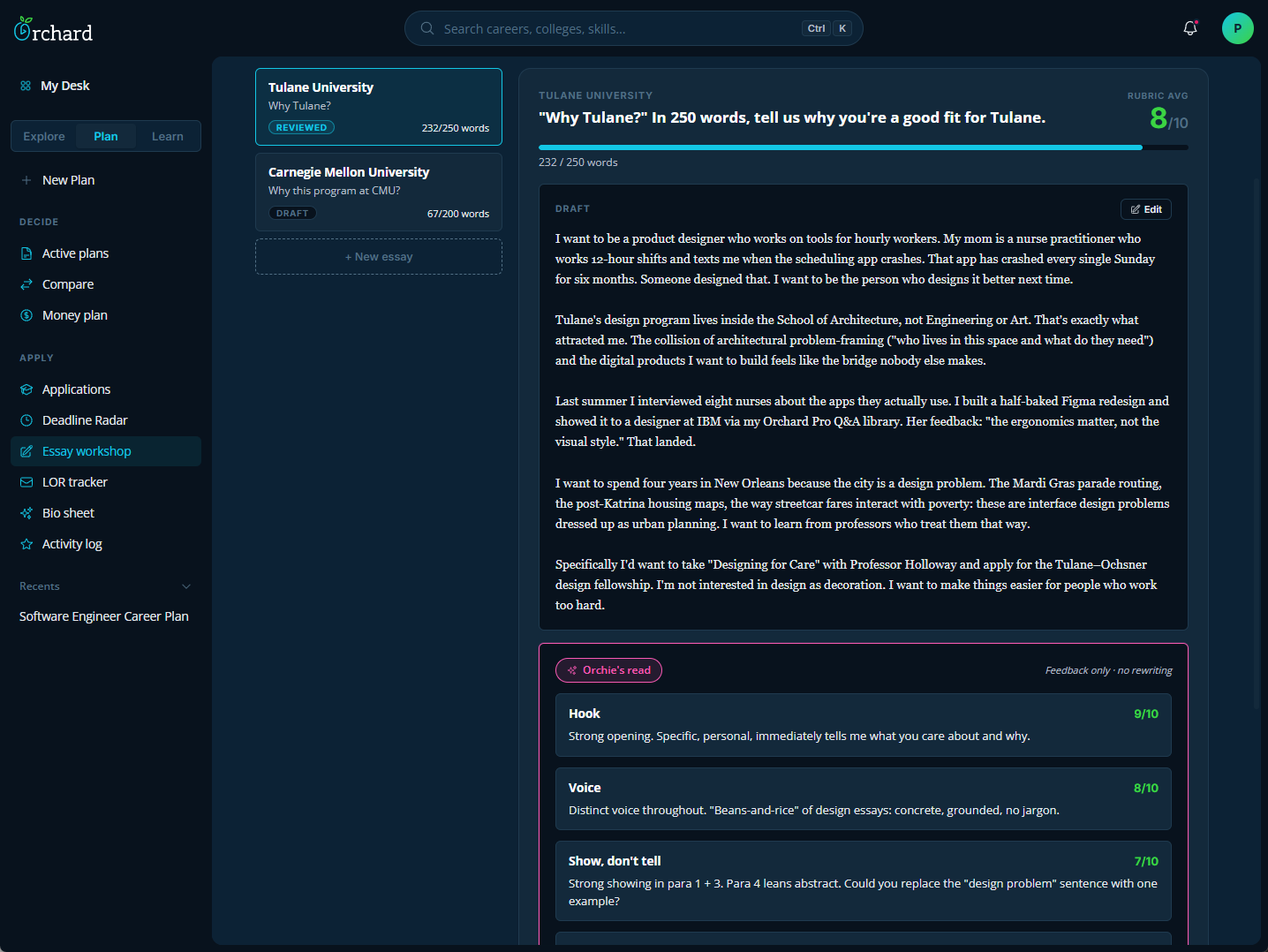
- 1 Rubric scores out of 10, not letter grades. A C+ feels like a verdict. A 7 feels like something you can move.
- 2 Feedback sits underneath the draft, not floating on top of it. The essay is the work, the notes are a second opinion. The student decides what to use.
- 3 Orchie scores, asks questions, and points at the paragraphs that need work. There's no "auto-improve" button on purpose. The voice in a college essay has to be the student's, or the whole piece collapses.
The Career Readiness Index (CRI)
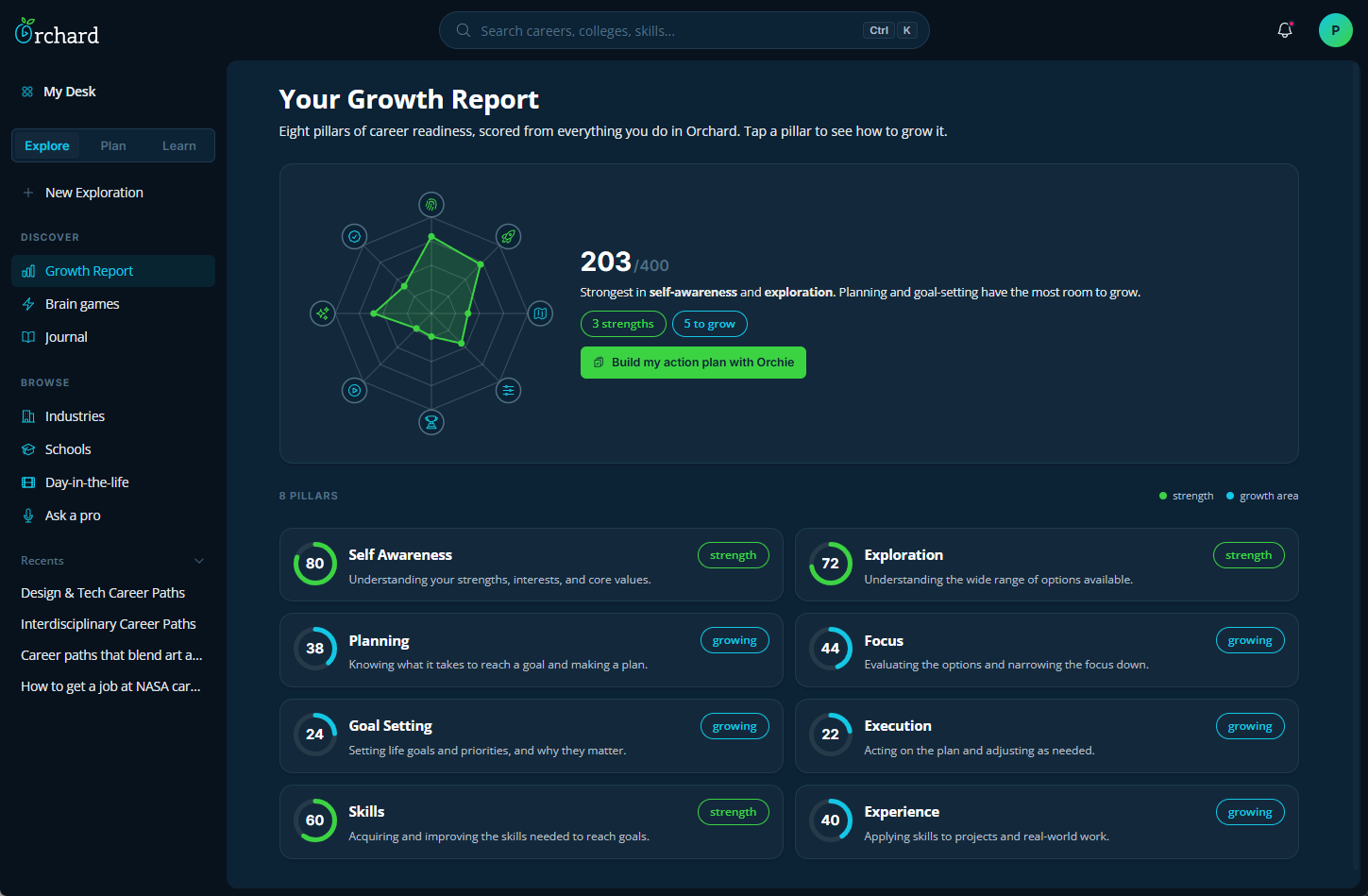
A personalized map that shows students exactly where they shine and where they have room to grow. This score feeds right into their Growth Report, giving them a clear look at their progress over time. Orchie uses this data to point out the best next steps, cheering them on as they take on new challenges and level up their score.
 1
2
3
4
1
2
3
4
- 1 A score across eight pillars we think make a student career-ready. Every nudge Orchie offers traces back to this number. We needed something measurable so a student could see real progress.
- 2 A spider graph instead of bars. The shape tells the story before any of the numbers do. A student can see strengths and growth areas in one glance.
- 3 Every pillar is clickable. Tap one to see what it means and the next concrete action that'll move it. The dashboard never just shows a number without showing what to do about it.
- 4 We call this view the "Growth Report" not the "CRI". The acronym feels like a test result. A growth report feels like something you can work on.
 1
2
1
2
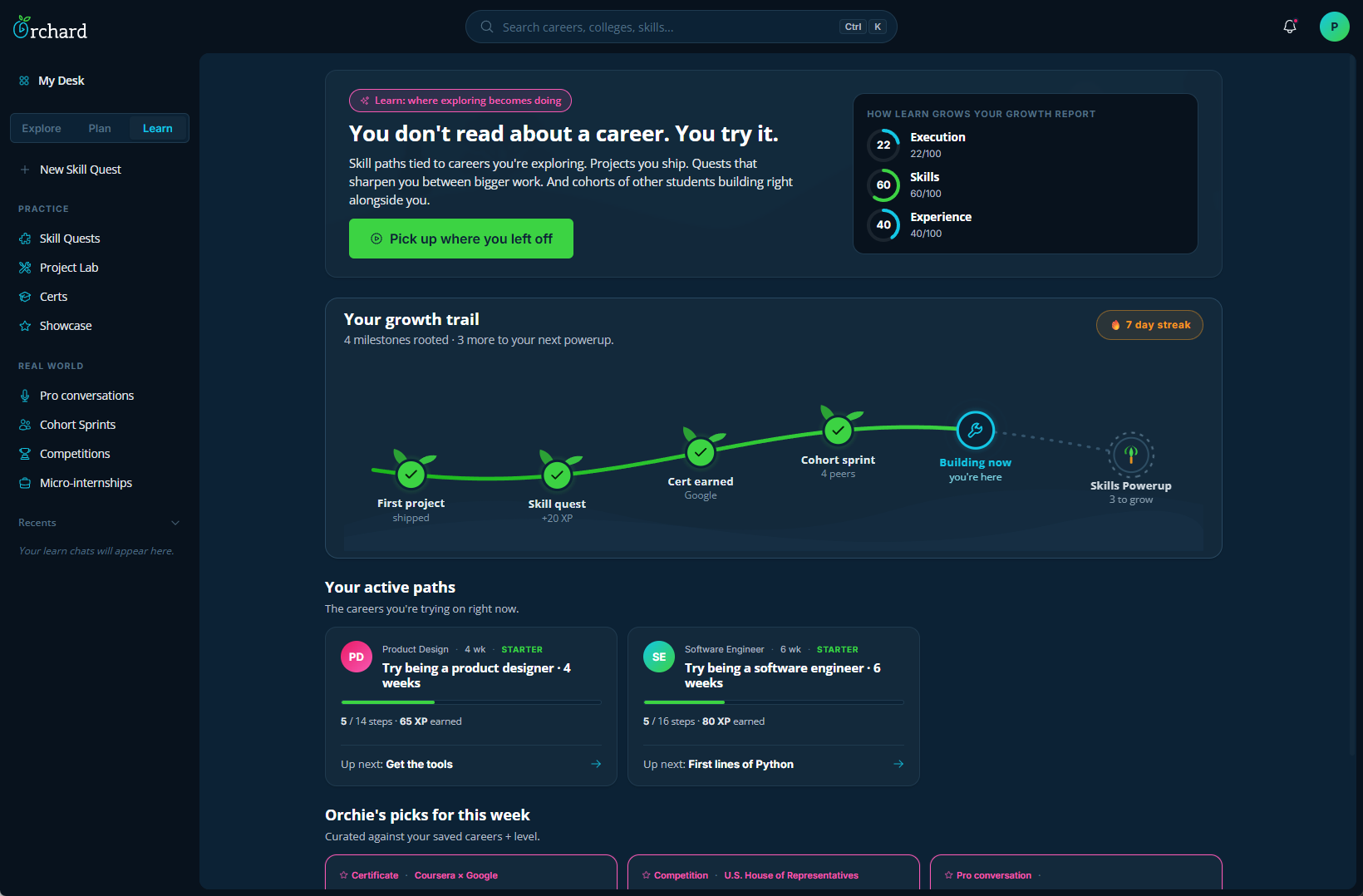
- 1 Every section in Orchard surfaces which pillars it actually moves on the Growth Report. No guessing whether an activity counts.
- 2 A trail because checklists reward what's done. The next milestone stays visible right next to the completed ones, which is what actually pulls a student to keep going.
 1
2
3
4
1
2
3
4
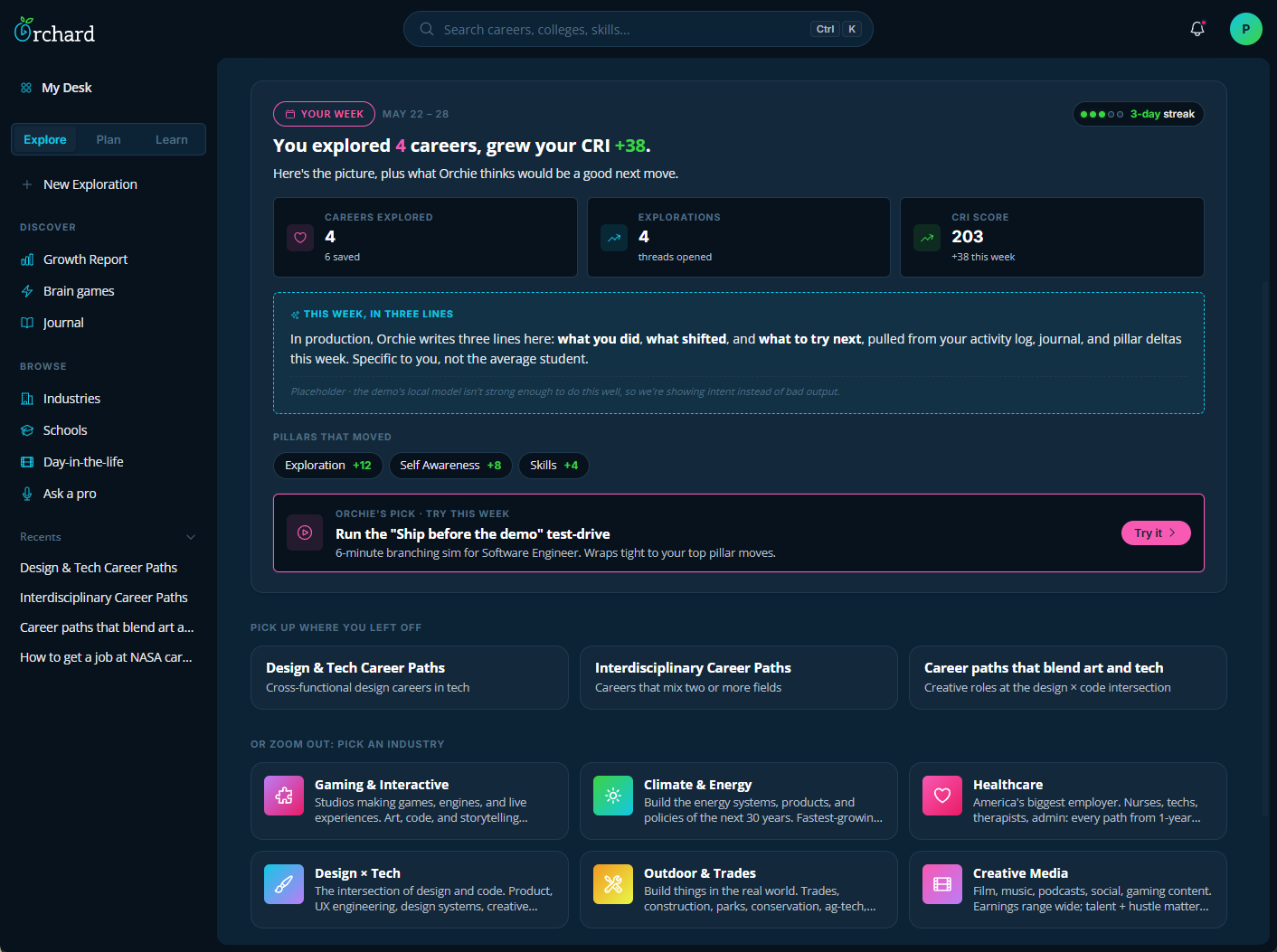
- 1 The weekly summary opens with what the student accomplished. Leading with what they missed would shame them out of even opening it.
- 2 Breaking the +38 down by pillar so the student can see which activities are doing the work. A single number tells you something moved. The breakdown tells you what to do more of.
- 3 Every summary ends with a next step, picked to push the pillars that already moved this week. Reflection without a next action would just sit there.
- 4 A concept block for three personal lines Orchie would write from the student's actual journal and pillar moves. Showing the intent in the design even when the local model can't yet write to that bar.
Explore, Plan, Learn
Our philosophy is simple: Explore the possibilities, Plan out your Goals, and Learn the Real-World Skills to get there. By putting students in the driver's seat, Orchard turns the overwhelming question of "What's next?" into an exciting, confident adventure.
Explore
 1
2
3
4
5
1
2
3
4
5
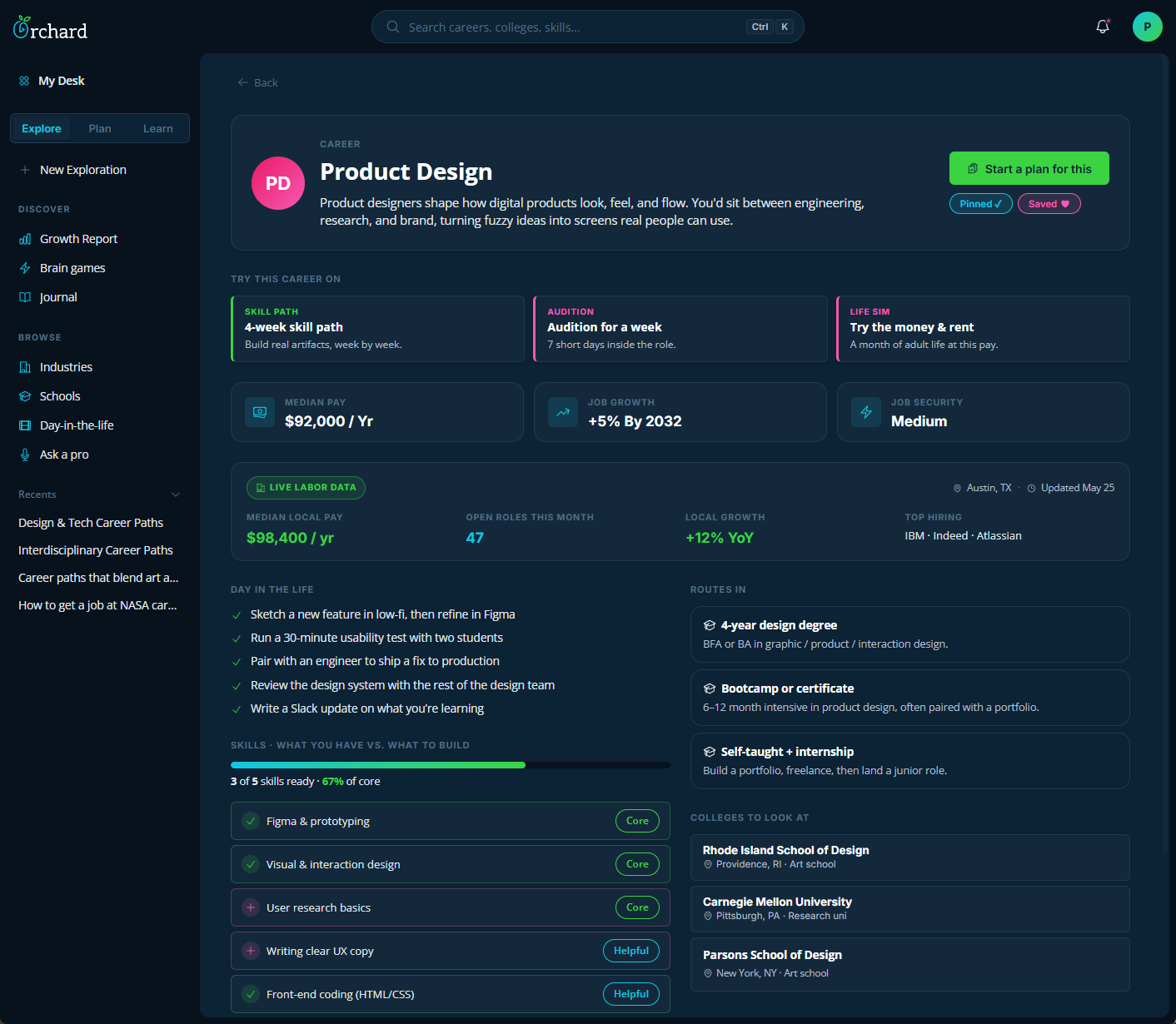
- 1 The Life Sim card lets a student spend a virtual month at the career's salary against their real rent and bills. A salary number on a page is abstract. Four weeks of actual decisions is concrete.
- 2 National pay numbers don't really answer what a sixteen-year-old wants to know, which is "can I support myself doing this where I live?" Local data pulls in who's actually hiring and what they're paying in the student's city.
- 3 The skills section reflects what the student has already done, not a generic list of requirements. Seeing "three of five ready" turns "this career is out of reach" into "I'm closer than I thought."
- 4 Four-year, bootcamp, and self-taught all live in identical cards on the page. We made each path look equally important so the layout itself reflects the philosophy: there's no "default" path, just paths that fit different students.
- 5 "Day in the Life" translates the career title into the small concrete things you actually do. Sketching a feature, running a thirty-minute test, writing a Slack update. "Product Designer" is abstract. "Today I made a Figma file" is something a high schooler can picture.
Plan
 1
2
3
4
5
1
2
3
4
5
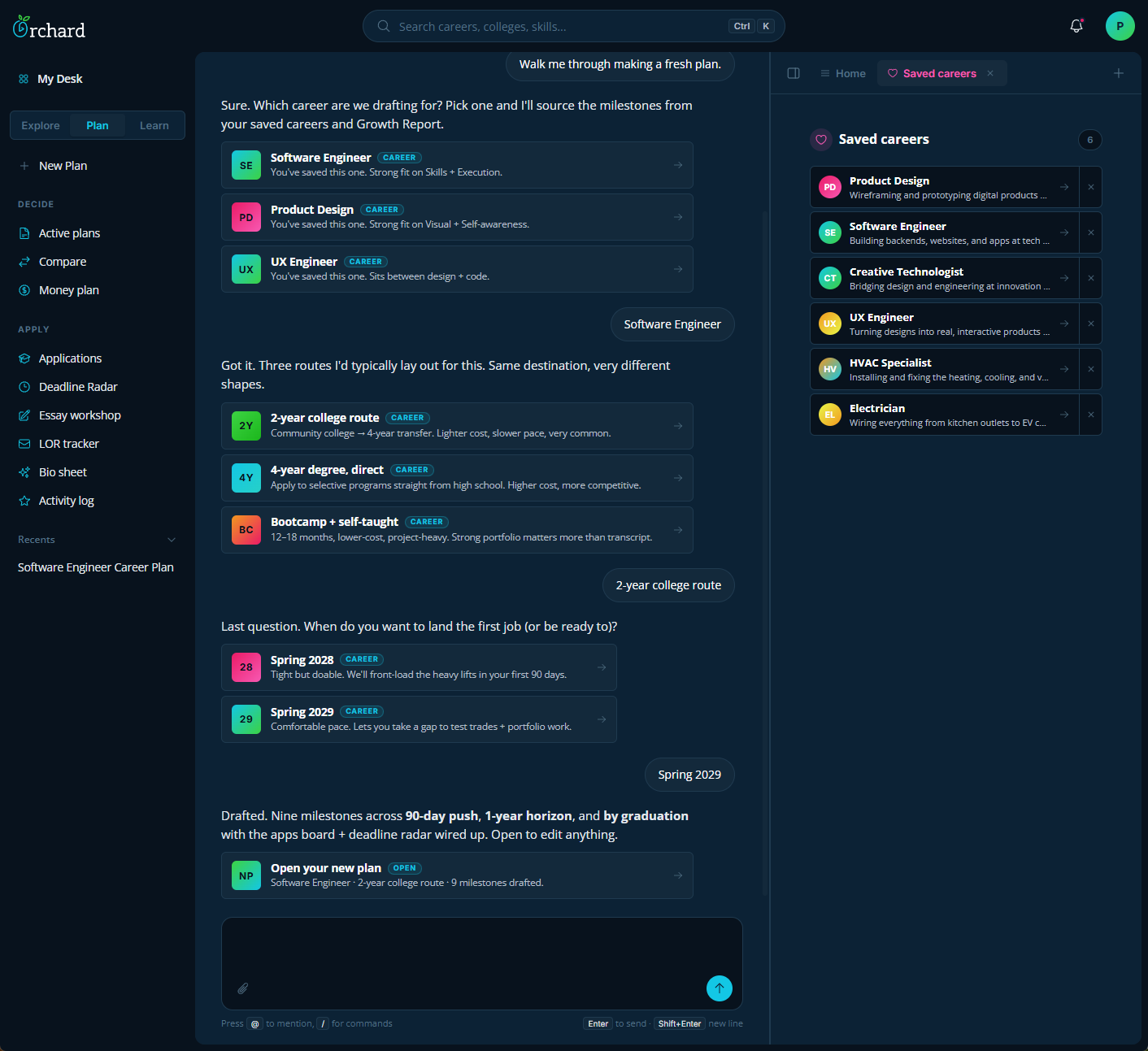
- 1 Building a career plan in one sitting can paralyze a sixteen-year-old. We designed Plan as a conversation that asks one question at a time, so the student can't see the whole mountain at once and freeze up.
- 2 Orchie reads what's open on the desk and starts the conversation from there. With Saved Careers open, the first question is which career to plan around, not what the student wants help with.
- 3 Three routes laid out side-by-side, same destination. The 2-year, the 4-year, and the bootcamp get identical visual weight on the page. The layout reinforces that all three end at "employed as a Software Engineer."
- 4 The timing question gives the student two options, not a fixed deadline. "Tight but doable" or "comfortable pace with gap-year room." The student picks the stress level that fits their actual life.
- 5 The plan lands at three horizons: a 90-day push, a 1-year horizon, and the graduation target. A goal four years away is hard to act on. A goal ninety days away is something you can do this week. It's a great outline for the student to start. It's a living plan that will grow and change as the student takes more action.
Learn
 1
2
3
1
2
3
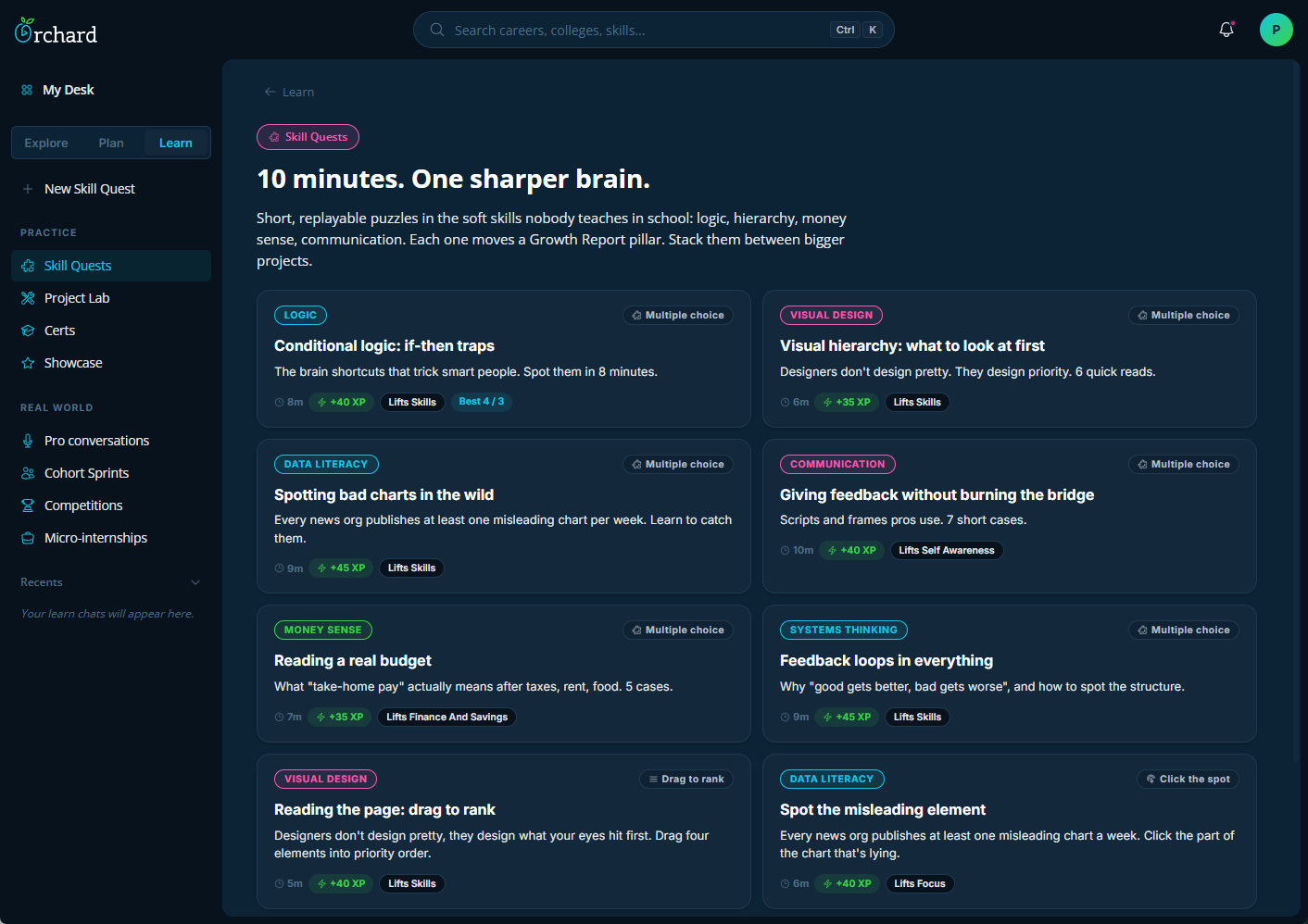
- 1 Skill Quests run ten minutes or less each. Anything longer starts to feel like assigned homework. We made each one short enough to fit into a locker break, so they can practice any time.
- 2 Each quest is tagged with which Growth Report pillar it moves. "Lifts Skills" or "Lifts Focus" shown right on the card. Without that, it's a random activity. With it, the student knows exactly why they're playing.
- 3 The categories are what schools usually skip. Reading a real budget. Spotting a misleading chart. Giving feedback without crushing someone. These show up in every career and every adult life, but rarely in a curriculum.
My Role
Head of Product & Design
My Contributions
- 0→1 product design and strategy: Defined the surface, the modes, and the philosophy. Designed Orchie, the Career Readiness Index, and the Explore / Plan / Learn structure as one cohesive system.
- AI as a coach, not a doer: Established the Orchie guidelines: surface options, ask better questions, never produce the student's work. Orchie is there to nudge the student when they get stuck and help keep the momentum when they're on a roll.
- Making growth measurable: Designed the CRI and its eight pillars so the score moves on real behavior. The hardest design call on the project, and the one that has taken the most iterations.
- Prototyping: Built the working prototype with AI so stakeholders and test users interact with the same thing.